
This document is designed to guide developers from Ai-Media's customer organizations in building API-based integrations for Recorded Media workflows. These workflows can leverage both AI-driven LEXI Recorded services and captioner-assisted Recorded Premium order types.
Latest version of this document can be found at https://doc.recorded.ai.media/api-integration/AIM_RM_API.html (PDF: https://doc.recorded.ai.media/api-integration/AIM_RM_API.pdf).
If you have questions or encounter issues, please reach out based on the type of support you need:
General Inquiries and Usage Support:
For questions about our services or assistance with order management, please contact:
If you are unsure who to contact, check Recorded Media Product Support page.
Technical and Integration Support:
For specific technical questions related to API usage or integration development, you will have direct communication with the product team based in Australia. Your Account Manager, Operations Team, or Support Team can assist in establishing this connection, ensuring you receive the appropriate assistance.
We are committed to providing timely and effective support to help you maximize the value of our services and integrate our API seamlessly into your systems.
There is no charge associated with the number of API requests made. Customers are billed based on the duration of the source media in their orders, and rates may vary depending on the type of order.
For any questions regarding billing, rates, invoices, or a cost waiver for testing, please contact your account manager or the operations team in your region.
Ai-Media offers robust integration capabilities and flexible architecture to seamlessly incorporate LEXI Recorded and Recorded Premium into end-to-end media production workflows. At the core of this integration is Ai-Media's Orders API, providing customers with the ability to initiate new orders, monitor order outcomes, receive real-time notifications for order status changes, and retrieve captions. The developer-friendly nature of the API is attributed to its adherence to industrial standards, including REST, JSON, API key, HTTPS, and TLS, making it straightforward to navigate and easy to work with. This single API interface supports both AI-fulfilled LEXI Recorded and captioner-fulfilled Recorded Premium order types, facilitating a smooth transition between AI and captioner-based captioning without hassle or disruption.
Recognizing the diversity of production workflows and unique business requirements, Ai-Media ensures that integration with its platform is not a one-size-fits-all approach. In response to this, Ai-Media summarized several architecture patterns that can be applied during the integration design process. These architecture patterns serve as adaptable frameworks, allowing organizations to tailor the integration to align seamlessly with their distinct workflows and business specifications.
Organizations endowed with software development capabilities, whether through in-house teams or external contractors and vendors, could build direct integration using Ai-Media's Orders API. This approach is future proof and grants maximum flexibility, enabling a customized integration aligned with the unique needs of the organization. By leveraging the Orders API, these organizations can seamlessly integrate Ai-Media's services with their internal systems and workflows. This method offers the highest degree of automation, minimizing daily operational efforts, and affords full control over intricate details such as the formatting of captions, selection of output languages, and the utilization of topic models. This level of control empowers organizations to tailor the integration to their precise specifications, fostering a seamless and efficient workflow that aligns with their specific business requirements.
This diagram below illustrates a solution based on API integration:
For organizations seeking minimal involvement in software development, opting for a solution based on mutually accessible file storage, such as an AWS S3 bucket or SharePoint, can be a practical starting point. In this scenario, Ai-Media can periodically scan the designated input folder to identify and process new files. Once the caption file is ready, it is returned to the same folder or directed to a dedicated output folder, allowing to be retrieved. While this approach may not deeply integrate with the organization's internal workflows, making it less impactful in streamlining the end-to-end process, it presents a straightforward and easy-to-adopt solution for many organizations. This method minimizes implementation challenges and proves to be the least disruptive option, catering to organizations seeking a quick implementation with minimal software development involvement.
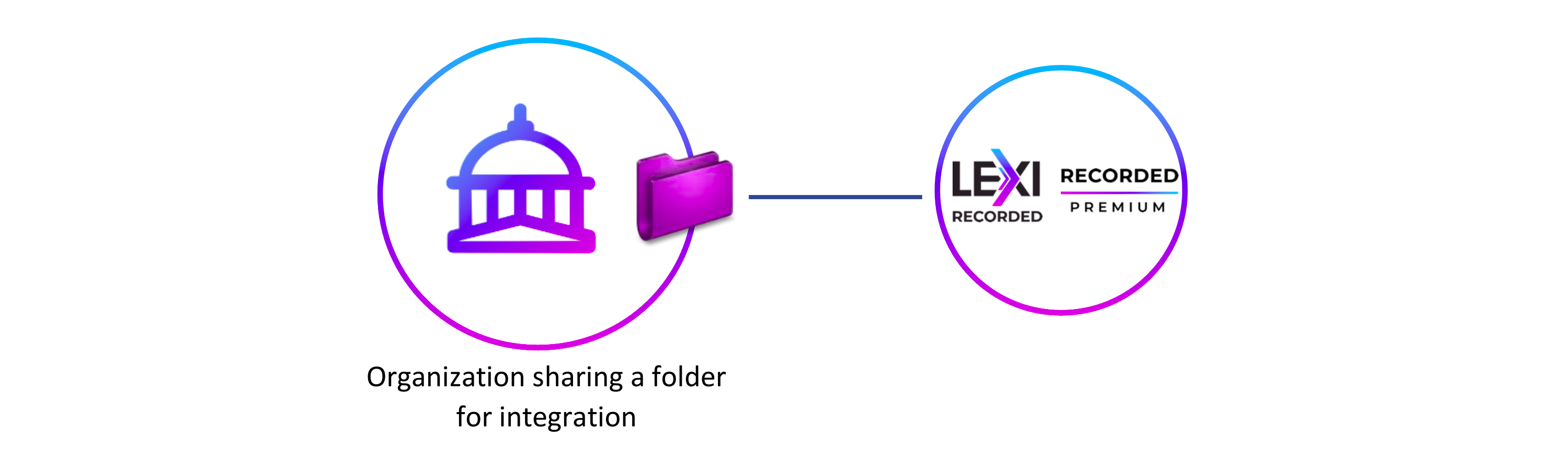
The shared folder could be provided by either the customer or Ai-Media. This diagram below illustrates the scenario that the customer provides the shared folder for Ai-Media to access:
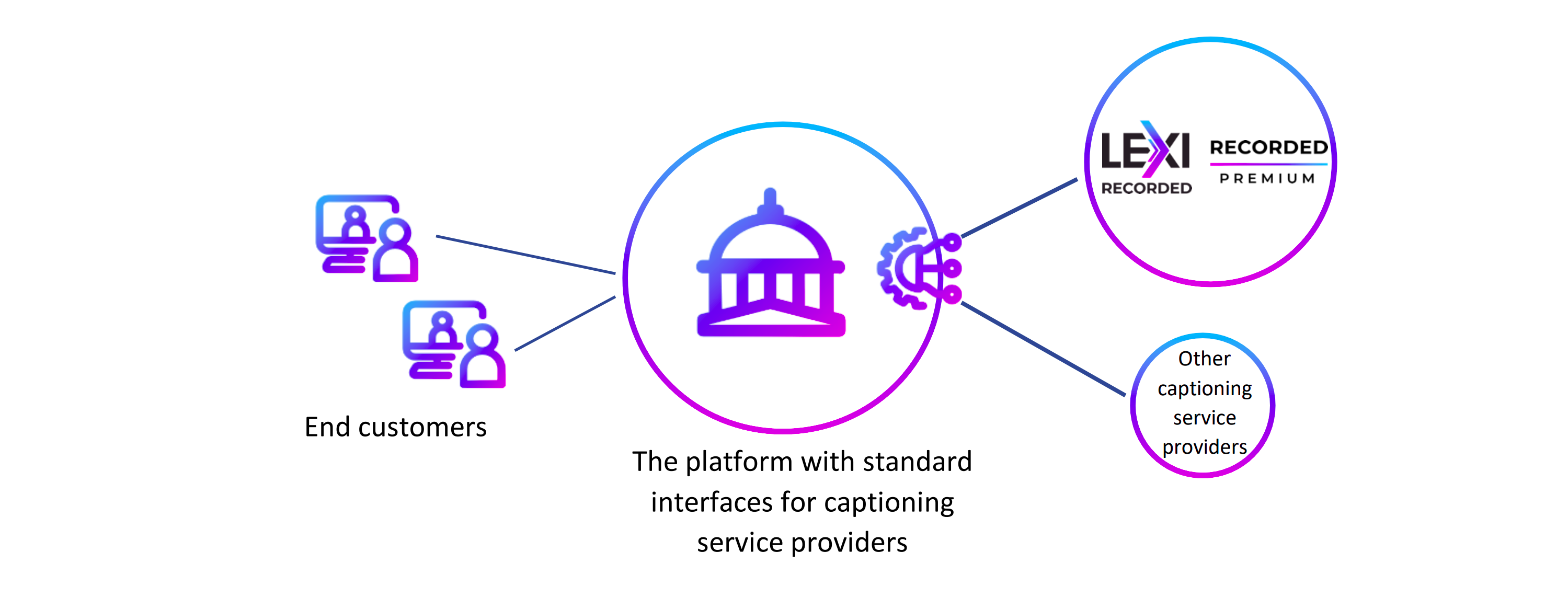
For organizations that have already established standard interfaces for captioning service providers, Ai-Media offers to develop integrations based on their existing interface specifications. This tailored approach allows Ai-Media to support those organizations to offer advanced captioning services to their customers.
This diagram below illustrates how Ai-Media can join the ecosystem and offer its services through the platform:
| Concept / Term | Definition |
|---|---|
| Order (Customer Order) | A service request processed by Ai-Media, encompassing all input data, configurations, metadata, and associated resulting outputs. An order may involve tasks like AI-driven captioning, human-led translation, etc. Typically, an order includes source media, language and format settings, and when the order is fulfilled, the final job outputs. |
| Order Item | An individual component within an order. While an order generally contains only one item, multiple items can be included. A single-item order ensures that the success or failure of one item doesn't impact others within the same order. |
| Topic Model | A set of domain-specific configurations designed to enhance output quality. A topic model may include an optional custom vocabulary and an optional substitution list. |
| Custom Vocabulary | A list of words or phrases pertinent to a particular domain, used to improve the accuracy of the output. Example: "Messi." |
| Order Type | The category of the order, such as "BasicLexi" or "Captioning." This defines the nature of the service provided. |
| By AI | Refers to fulfilling orders using fully automated, AI-driven technologies. |
| By Professionals (By Captioners) | Refers to fulfilling orders by human professionals, often with technological support. |
| Output format | The file format of the resulting output, such as SRT, VTT, SCC, or TTML. |
| API Key | A secure, randomly generated string used for authentication and authorization. Typically, the API key is transmitted via the HTTP header "x-api-key." |
The diagram below illustrates how fully automated integration via the Orders API can complement or replace the manual workflow managed through the web portal. With the Orders API, manual intervention becomes optional, allowing for a more streamlined and automated process.
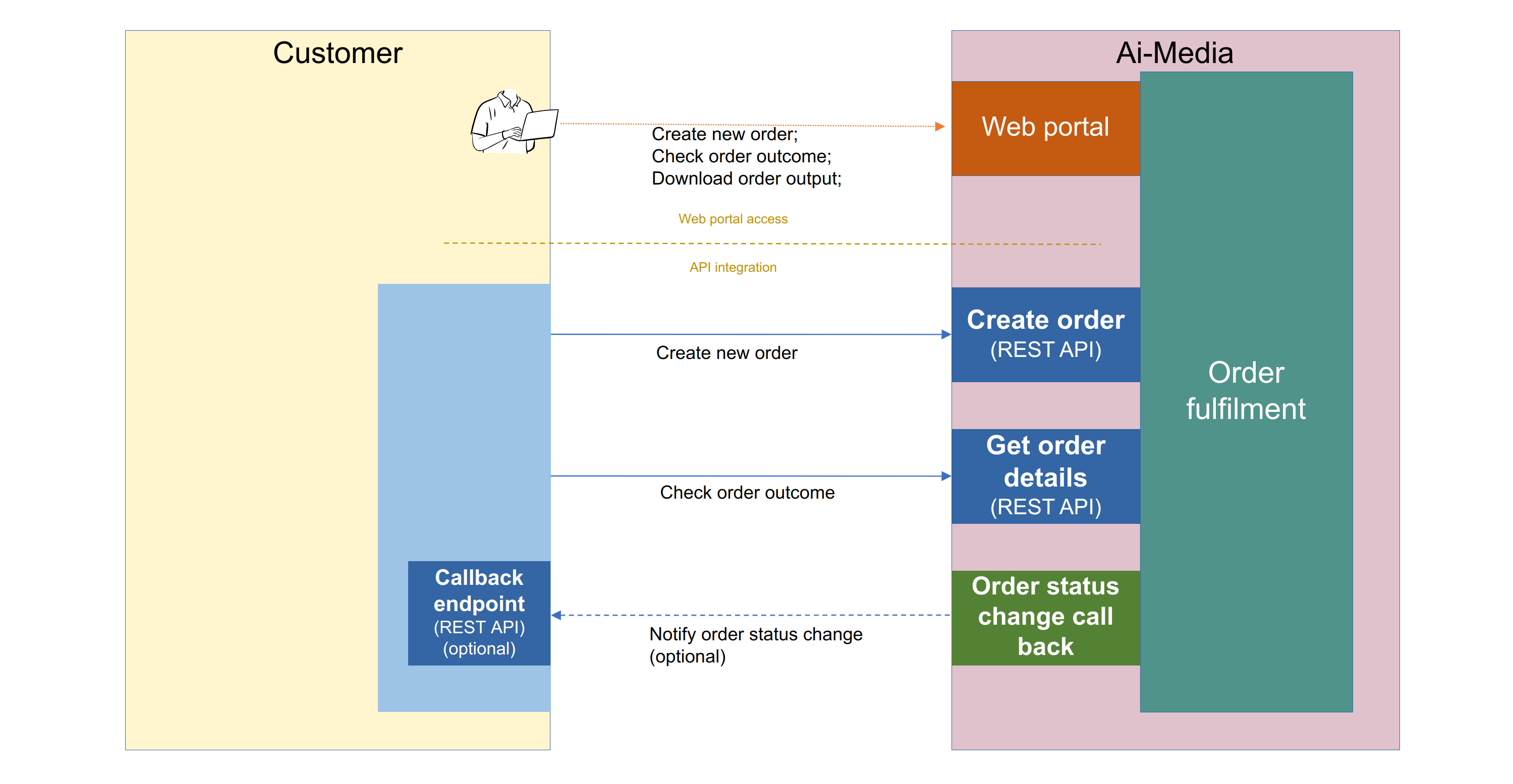
By utilizing the Orders API, customers can automate the entire workflow from order creation to completion, significantly reducing manual efforts and improving efficiency. The flexibility of this API allows for seamless integration into existing systems, supporting various media processing needs with minimal manual intervention.
Here's a breakdown of how this workflow operates:
The integration begins with the customer's system sending a POST request to the Orders API to create a new order. This request includes all necessary details, such as the type of service required, the source media URL, and language settings. The API responds with a unique customerOrderId, which will be used for tracking and managing the order.
After the order is created, the customer can retrieve detailed information about the order by sending a GET request to the Orders API, using the customerOrderId. This endpoint provides the current status of the order, including whether it's in progress, completed, or if any issues have arisen. If the order is in a completed state, the response will also include the outputs associated with the order, such as caption files generated during processing.
To further streamline the process, the customer can set up a callback endpoint. This is an optional feature where Ai-Media will automatically send a notification to the customer's system whenever there is a status change in the order. This eliminates the need for continuous polling and allows the customer's system to react immediately to status updates.
If the callback endpoint is configured, it will receive notifications about any changes in the order's status, such as completion or failure. This allows the customer's system to handle these updates automatically, such as by downloading the final output or triggering additional workflows based on the order's completion.
The Orders API also provides an endpoint for retrieving list of orders within specified time window. The response provides a summary for each matching order.
Please note that only orders created within 400 days are available for query.
Orders API is available in the following regions:
It is recommended to use the API endpoint in the closest region to the caller of the API.
Availability of the API and incidents are published through the status page under "Recorded Cloud" group. The status page is accessible through the link https://aimedia.statuspage.io/.
To successfully invoke the API, a valid API key must be included in the "x-api-key" header of the request.
Ai-Media does not charge for API calls. Customers are billed based on the duration of the source media in their orders; rates may vary by order type.
If you would like to request a waiver of service usage costs during your development or testing phase,
please contact your dedicated account manager or email recorded.services@ai-media.tv.
There is no separate self-serve sandbox product or staging/testing environment. For integration development and testing, use API key provided by AI-Media for production environment.
Orders created in during development and testing still consume processing capacity and would incur usage charges unless a cost waiver has been arranged.
The Orders API does not currently have request-rate or concurrency quotas or limitations.
AI-Media does not charge per API call; however, clients should still make requests at a reasonable rate
(for example, avoid tight polling loops when a callbackUrl can be used instead).
If you expect sustained high-volume traffic (bulk order creation, aggressive polling, or large parallel conversion workloads), contact AI-Media before go-live so capacity can be reviewed.
All requests sent to and responses received from the Orders API use the "application/json" content type.
In cases where an error occurs, the Orders API will return a response with an HTTP status code indicating the nature
of the error (e.g., 400 Bad Request, 401 Unauthorized, 404 Not Found).
The response body will follow a standard structure in JSON format:
{
  "message": "details of the error"
}
Sometimes the response also include a correlationId field. Please include that value when contacting support.
The message string is the primary signal for diagnosing failures. Common statuses and representative messages are listed below.
Exact wording may vary slightly (for example when a URL, language code, or field path is interpolated).
400 Bad RequestRepresentative message |
Typical cause |
|---|---|
Request body must be in valid JSON format / Invalid JSON in request body |
Body is missing or is not valid JSON |
orderItems field must be an array and contain at least one item |
Missing or empty orderItems |
Invalid CreateOrderInput: CreateOrderInput/... must be ... |
Request fails schema validation (wrong type, missing required field, invalid enum, etc.) |
<field> must be between <min> and <max>, but it is: <value> |
Numeric field out of allowed range (for example voice rate or turnaround) |
sourceMediaUrl is required for order type '<orderType>' but is missing or empty |
Required media URL omitted for LEXI Recorded / LEXI AD |
Source media at location '<url>' is not accessible / ... timed out / ... can't be recognised / ... is not in a supported format |
Source media cannot be fetched or probed |
Can't find audio stream in source media at location '<url>' |
Media has no usable audio track |
Source media at location '<url>' has duration <N>s which exceeds the maximum of <M>s allowed for order type '<orderType>' |
Source longer than the order-type limit |
Output voice '<name>' is not valid for language '<lang>' in order item. Available voices: ... |
Voice/language combination not supported |
<lang> is not a valid translation language |
Unsupported translation language code |
Number of custom vocabulary entries should be no more than 1000 |
Custom vocabulary too large |
Topic model with id <id> does not exist |
Unknown or inaccessible topic model |
Rate is not configured for CustomerName: [...], OrderType: [...], ... |
Customer rate card missing for the requested order type / quality / turnaround |
Invalid input format: <format> / Missing or invalid output format: <format> |
Output conversion request uses an unsupported format |
language query parameter is required |
GET /voices called without language |
401 UnauthorizedRepresentative message |
Typical cause |
|---|---|
Unauthorized |
Missing, invalid, or disabled API key (x-api-key header) |
403 ForbiddenRepresentative message |
Typical cause |
|---|---|
Forbidden |
Authenticated, but the API key / user lacks permission for the operation |
This operation is not allowed through API key based authentication |
Endpoint is restricted to JWT authentication |
404 Not FoundRepresentative message |
Typical cause |
|---|---|
Not Found |
Order ID does not exist, or the caller is not allowed to see it (access denial may be returned as 404) |
Order item not found |
Order item ID in the path does not exist |
Order item output not found: orderItemId=..., fileId=... / Output document not found: ... |
Conversion target output does not exist |
500 Internal Server ErrorRepresentative message |
Typical cause |
|---|---|
Internal Server Error |
Unexpected failure; response includes correlationId for support |
Use POST /orders/validate during integration development to surface validation messages without submitting a billable order.
The OpenAPI Specification (OAS) defines a standard, language-agnostic interface to HTTP APIs which allows both humans and computers to discover and understand the capabilities of the service. The OpenAPI document for the Orders API is available at https://doc.recorded.ai.media/api-integration/swagger-ui/index.html .
This endpoint can be used for getting order details, checking order status and getting order outputs.
Customer order ID can be specified as part of the URL path. If there's no order found by that ID, a 404 response will be returned. Otherwise, the full details of the order will be returned.
The response includes the externalIntegrationId and externalIntegrationData fields if they were provided when creating the order. These fields can be used to retrieve custom data you stored with the order.
Each order item in the response includes an actionsRequired array, listing the steps that are waiting on a human before the order item can go any further, such as labelling people or editing the AD script. It is empty when nothing is pending. Every entry has a label describing the action, a url at which to perform it, and a role array saying who the action is for: user for actions the customer performs and coordinator for actions Ai-Media performs. To show a customer only what they can act on, keep the entries whose role contains user. Pending actions are reported here and nowhere else — the output array holds downloadable files only.
Each order item in the response includes a canStartNewIteration field for Iterative LEXI AD order types (see LEXI AD order types); it is omitted for all other order types. It is true when a new iteration can be started, taking into account both the 7-day time window since order creation and how far the order item has got — it is false while audio description is still being produced, because a new iteration started then would discard the work in progress. The requirements it reflects are the same ones POST /order-items/{id}/iterations enforces, so the two cannot disagree. It remains a point-in-time answer: an order item can move on between the field being read and an iteration being requested, so the request itself may still be refused.
This endpoint can be used for submitting a new order.
Details of the new order should be included in the request body.
If the order is successfully submitted, its customer order ID and order reference will be included in the response body. If the order details do not pass validation, detailed error message will be returned in a 400 response.
The duration of the source media is inspected during validation and must not exceed the maximum allowed for the order type:
| Order type | Maximum source media duration |
|---|---|
| LEXI AD (all variants, including Extended) | 4 hours |
| LEXI Recorded / BasicLexi | 12 hours for most input/output language combinations, 4 hours for some combinations |
When the source media is longer than the allowed maximum, a 400 response is returned with a message of the form
Source media at location '<url>' has duration <seconds>s which exceeds the maximum of <seconds>s allowed for order type '<orderType>'.
This endpoint can be used for validating new order details without actually submitting it.
Details of the new order should be included in the request body.
If the order is successfully validated, a 204 response will be returned. Otherwise, detailed error message will be returned in a 400 response. The same source-media duration limits documented for POST /orders apply here.
This endpoint can be used for querying orders with pagination. Filtering condition can be specified in query string.
start - The earliest creation time of the orders to be retrieved, in ISO 8601 format UTC, e.g. 2024-01-01T00:00:00.000Z, inclusive.
It can be omitted if a lower boundary of creation time is not desired.end - The latest creation time of the orders to be retrieved, exclusive, with specific behaviour depending on the page being queried.
First Page: When retrieving the first page, this value specifies the latest creation time (exclusive) of the orders to be retrieved,
formatted as an ISO 8601 timestamp UTC (e.g., 2025-01-01T00:00:00.000Z).
It can be omitted if a upper boundary of creation time is not desired.
Subsequent Pages: When retrieving subsequent pages, this value must be set to the uniqueOrderCreatedTimestamp value of the last (earliest)
order from the page returned from previous API call.
The value of uniqueOrderCreatedTimestamp field looks like 2024-10-01T04:21:30.831Z_65d2f5b9-aaef-4d8a-8e4a-5ffeadf4093f.allRegions - Whether the query should be performed on orders in all regions.
If omitted or set to false, the query is performed on orders in the same region as the API endpoint.Response body from this endpoint is an array of order summaries. Orders in the array are sorted by creation time in descending order.
Each order summary in the response includes the externalIntegrationId and externalIntegrationData fields if they were provided when creating the order. These fields can be used to retrieve custom data you stored with the order.
To retrieve all the orders through pagination, the logic below can be followed:
start (optional), end (optional). They specify the desired time window for the query.results.results is less than the number you need, repeat the following:start and end as parameters.results.uniqueOrderCreatedTimestamp field on the last order just retrieved, and set it as the new value of endresults should contains all the order summaries you need.This endpoint allows you to retrieve available voices for a specific language code. This is useful when configuring text-to-speech or voice synthesis options for your orders, particularly for narration services like LexiAD.
Query Parameters:
language (required): The language code to get available voices for (e.g., en-US, en-GB, en-AU)orderType (optional): Order type to filter voices by order type.Response: The endpoint returns an array of voice objects, each containing a code, descriptive name, and optional sample URL for audio preview:
[
  {
    "code": "en-au-william",
    "name": "William (Male, Australian)",
    "sampleUrl": "https://d136xw242vw8vv.cloudfront.net/voice-samples/en-AU_en-au-william.mp3?Expires=..."
  },
  {
    "code": "en-au-neil",
    "name": "Neil (Male, Australian)"
  }
]
This endpoint allows you to retrieve available topic models for your customer account. Topic models are predefined sets of custom vocabulary and substitution rules that can be reused across multiple orders.
Query Parameters:
customerName (optional): The customer name to get available topic models for. This parameter is only effective if the caller is an internal staff member or coordinator. If omitted, the topic models available to the authenticated customer will be returned.Response:
The endpoint returns an array of topic model identifiers (strings). Shared common topic models (managed by Ai-Media) are listed first and have the ai-media/ prefix, followed by customer-specific topic models in alphabetical order.
[
  "ai-media/disfluency",
  "ai-media/profanity",
  "my-custom-model",
  "sports-terminology"
]
ai-media/ prefix are shared common topic models managed by Ai-Media that are available to all customers.This endpoint allows you to retrieve all available languages with their codes and names. You can optionally filter by order type and input language to get only the languages that are supported for specific scenarios.
Query Parameters:
orderType (optional): The order type to get available languages for (e.g., ASR, LexiAD, Translation)inputLanguage (optional): The input language to get available languages forResponse:
[
  {
    "code": "en",
    "name": "English"
  },
  {
    "code": "es",
    "name": "Spanish"
  },
  {
    "code": "fr",
    "name": "French"
  }
]
This endpoint allows you to retrieve all available translation languages with their codes and names. You can optionally specify a source language to get only the languages that are supported for translation from that source.
Query Parameters:
sourceLanguage (optional): The source language to get available translation languages for. If omitted, returns all supported translation languages.Response:
[
  {
    "code": "es",
    "name": "Spanish"
  },
  {
    "code": "fr",
    "name": "French"
  },
  {
    "code": "de",
    "name": "German"
  }
]
This endpoint allows you to convert order item output files from one format to another. Currently supports converting SRT and VTT format outputs to other formats such as DOCX, STL, TTML, DFXP, MCC, and SCC.
Both GET and POST methods are supported. Use POST when you need to specify additional conversion options in the request body.
Path Parameters:
orderItemId (required): The ID of the order item containing the output to convertfileId (required): The file ID of the output document to convertQuery Parameters:
outputFormat (required): The desired output format code (e.g., docx, stl, ttml, dfxp, mcc, scc-29.97fps-df)Request Body (POST only, optional): When using POST, you can include additional conversion options in the request body as JSON:
{
  "includeFormatting": true
}
includeFormatting (optional, boolean): Whether to include formatting in the converted output. If not specified, defaults to the service's default behavior.Requirements:
Response: The endpoint returns the converted file as binary content with appropriate headers:
Content-Type: application/octet-streamContent-Disposition: attachment; filename="<original-filename>.<extension>"Error Responses:
400: Bad request (e.g., invalid output format, invalid input format)404: Order item or output document not found403: Insufficient permissions500: Internal server errorExamples:
GET /order-items/item123/output/file456/convert?outputFormat=docx
POST /order-items/item123/output/file456/convert?outputFormat=docx
Content-Type: application/json

{
  "includeFormatting": true
}
This endpoint returns details for a single order item together with its parent order (without sibling items).
Order item ID can be specified as part of the URL path.
If there's no order item found by that ID, a 404 response will be returned.
Otherwise, the response body matches GetOrderItemDetailsOutput from @ai-media/common-common:
orderItem — the requested item in the same shape as an element of GET /orders/{id} orderItemsorder — parent order fields from GET /orders/{id}, excluding orderItemsAuthorisation is evaluated against the requested item only (not sibling items on the parent order).
This endpoint starts a new iteration (in-place rework) on an existing Iterative LEXI AD order item. It applies optional setting changes from the request body, selectively re-enters the LEXI AD workflow, and returns any next pending actions for the caller.
Request and response bodies follow the CreateIterationInput and CreateIterationOutput types from @ai-media/common-common.
Path Parameters:
id (required): Order item ID. Supplied to the service as CreateIterationInput.orderItemId (do not send orderItemId in the request body).Request Body:
Corresponds to CreateIterationInput from @ai-media/common-common, excluding orderItemId (taken from the path).
CreateIterationInput is a partial of CreateOrderInputItem plus a partial pick of order-level CreateOrderInput fields, with one iteration-specific property:
| Field | Type | Description |
|---|---|---|
startAt |
IterationStartAt (optional) |
Where in the workflow to start the iteration. If omitted, the iteration starts at the feasibly earliest beginning of the workflow. |
| (order-item overrides) | partial CreateOrderInputItem |
Any CreateOrderInputItem fields present override the original order item. Common LEXI AD overrides include outputLanguage, outputVoice, and outputLanguages (each { code, voice? } with voice as { name, rate? }). |
| (order-level overrides) | partial pick of CreateOrderInput |
Any of these fields present override the original order: additionalOutputFormats, audioDescription, audioEvents, customVocabularyEntries, customerInstructions, extractVocal, outputFormatting, outputOptions, substitutions, topicModelIds, videoIntroduction, translationLanguages. |
IterationStartAt values (LEXI AD):
| Value | Description |
|---|---|
LabelFaces |
Start by re-labeling the faces |
GenerateAdScript |
Start by re-generating the audio description script(s) |
ReviewAdScript |
Start by reviewing and editing the AI-generated audio description script(s) |
GenerateOutputs |
Start by re-generating the outputs from the existing audio description |
Nested shapes for overrides match order creation (AudioDescriptionOptions, OrderOutputOptions, etc.). See Field reference and LEXI AD. Iteration is order-type specific; not all override fields are supported for all order types.
Changing audioDescription.startTime or audioDescription.endTime requires the iteration to start at AD script generation or earlier (GenerateAdScript or LabelFaces). Starting at ReviewAdScript or GenerateOutputs while changing those fields is rejected with HTTP 400, because those steps reuse the existing AD script.
Example request body (CreateIterationInput without orderItemId):
{
  "startAt": "GenerateAdScript",
  "customerInstructions": "Prefer concise descriptions of on-screen text.",
  "audioDescription": {
    "adScriptNeedsEditing": true,
    "noSpeechInSourceMedia": false,
    "maxCharactersRatio": 1,
    "minimumGapBetweenConversations": 3000,
    "maxPreConversationOverlap": 0,
    "maxPostConversationOverlap": 0,
    "startTime": 5000,
    "endTime": -2000
  },
  "outputOptions": {
    "audioDescription": {
      "generateAdAudio": true,
      "generateAdAudioInWav": true,
      "generateAdAudioInMp3": false,
      "generateAdVideo": true,
      "generateAdMixedInOriginal": false,
      "generateAdScript": true,
      "generateTranscript": false,
      "generateSourceMediaMetadata": false,
      "generateSourceMediaDescription": false
    }
  },
  "outputLanguages": [
    {
      "code": "en-AU",
      "voice": {
        "name": "en-au-william",
        "rate": 1
      }
    }
  ]
}
Requirements:
Completed, Failed or Cancelled) or stopped waiting for someone to label people or edit the AD script. Requests made while transcription, people identification, AD script generation or mixing in is under way are rejected, because a new iteration would discard that work.Completed for the whole of the iteration, so a further iteration is refused until that one finishes.audioDescription.startTime or audioDescription.endTime is only allowed when the iteration starts at GenerateAdScript or LabelFaces. Requests that change those fields while starting at ReviewAdScript or GenerateOutputs are rejected with HTTP 400.Callers can check the canStartNewIteration field on the order item (see GET /orders/{id}) to know in advance whether a new iteration can be started; it is derived from these same requirements.
Response (200):
Corresponds to CreateIterationOutput from @ai-media/common-common:
| Field | Type | Description |
|---|---|---|
id |
string | Iteration ID |
orderItemId |
string | Order item ID (same as in the request / path) |
customerOrderId |
string | Customer order ID, returned for the convenience of the caller |
pendingActions |
OutputFile[] |
Pending actions for this iteration. Every item should have role PendingAction. Empty when there is no pending action. Must not contain output files of other roles. |
Each pendingActions element is an OutputFile:
| Field | Type | Description |
|---|---|---|
url |
string | URL for the pending action |
role |
OutputRole (optional) |
Should be PendingAction for items in this array |
name |
string (optional) | Display name (e.g. Edit AD script, Label people) |
format |
OutputFormat (optional) |
Format/type of the output |
language |
string (optional) | Language of the output |
fileId |
string (optional) | Unique ID of the output |
size |
number (optional) | File size in bytes |
Example:
{
  "id": "iteration-id",
  "orderItemId": "order-item-id",
  "customerOrderId": "customer-order-id",
  "pendingActions": [
    {
      "role": "PendingAction",
      "name": "Edit AD script",
      "url": "https://…",
      "format": "actionUrl",
      "fileId": "…"
    }
  ]
}
If pending actions are not ready when the handler returns, call GET /orders/{id} to refresh.
Error Responses:
400: Bad request (e.g. not an Iterative LEXI AD item, status gate failed, invalid JSON)404: Order item not found, or the caller is not allowed to access it403: Insufficient permissions for the operationWith your API key in hand and your chosen endpoint region determined, you can start with initiating an order validation request.
Below is an example of an order validation/creation request payload:
{
"orderItems": [
{
"orderType": "BasicLexi",
"sourceMediaUrl": "https://your-domain/your-file.mp4",
"inputLanguage": "en",
"outputLanguage": "en-AU",
}
]
}
To validate the order details, send a POST request with the above payload
to https://au.api.orders.ai.media/orders/validate (or the equivalent endpoint in another region).
A 204 No Content response indicates that the payload is valid.
Once validated, you can then actually create the order by sending the same request body
to https://au.api.orders.ai.media/orders (or the equivalent endpoint in another region).
A successful creation will return a 200 OK response with a body like this:
{
"customerOrderId": "c32e2e37-1ea7-4e3a-9be8-1955d6948067",
"orderReference": "b0ij6ikckv"
}
customerOrderId: The unique identifier for the order.orderReference: A reference ID, typically used for UI purposes.After the order is created, you can monitor its status by sending a
GET request to https://au.api.orders.ai.media/orders/{customerOrderId} (or the equivalent endpoint in another region).
The response will include a status field that indicates the current status of the order.
If the order is completed, each item in the orderItems array will contain an output array with download links of output files.
The orderType field on order item allows the type of the order to be specified.
For "LEXI Recorded", the fully automatic AI fulfilled captioning/transcribing service, the orderType is BasicLexi.
For "LEXI AD", order types combine Standard vs Extended AD with independent face-labelling and AD script-editing options:
| Face recognition & labelling | AD script review & editing | Standard AD | Extended AD |
|---|---|---|---|
| Off | Off | BasicLexiAD |
BasicExtendedLexiAD |
| Off | Customer | IterativeBasicLexiAD |
IterativeBasicExtendedLexiAD |
| Off | AI-Media | ProfessionalAssistedIterativeLexiAD |
ProfessionalAssistedIterativeExtendedLexiAD |
| Customer | Off | CustomerAssistedLexiAD |
CustomerAssistedExtendedLexiAD |
| Customer | Customer | IterativeCustomerAssistedLexiAD |
IterativeCustomerAssistedExtendedLexiAD |
| AI-Media | Off | ProfessionalAssistedLexiAD |
ProfessionalAssistedExtendedLexiAD |
| AI-Media | AI-Media | IterativeProfessionalAssistedLexiAD |
IterativeProfessionalAssistedExtendedLexiAD |
Only BasicLexiAD and BasicExtendedLexiAD are automatically fulfilled. Types that require customer or AI-Media face labelling and/or AD script editing are not automatically fulfilled (API keys need the corresponding non-auto-fulfilled permissions).
For every Extended LEXI AD order item, audioDescription.extendedAdLengthTargetRatio is required (allowed range 1.1–2). Types with customer AD script editing use audioDescription.adScriptNeedsEditing to opt into the pause; types with AI-Media AD script editing always pause for that step. See LEXI AD specific order creation request fields.
Captioning is the most common order type for captioning done by professional captioners.
For order types of other services, please contact your local Ai-Media operations team or customer success team, or your account manager.
The order type must be configured for the customer account before an order of that type can be created.
If the order type is not configured or does not have correct rate configuration,
order creation or validation would fail with this kind of message: Rate is not configured for CustomerName: [<customer name>], OrderType: [<order type>], ....
To include additional details in the order, use the optional customerInstructions field,
which accepts a string.
Please note that any text provided in the customerInstructions field will not be utilized
for AI-fulfilled orders. However, for orders fulfilled by professionals, coordinators and
captioners may find this information helpful.
To store custom data associated with orders that can be retrieved later when fetching order details or querying orders, use the following fields:
At the order level:
externalIntegrationId - A string field for storing an identifier (e.g., your internal order ID, ticket number, or reference)externalIntegrationData - An object field for storing additional custom data (e.g., metadata)These fields are optional when creating orders and will be included in the response when getting order details via GET /orders/{id} or when querying orders via GET /orders.
At the order item level: If you need to store custom data at the order item level instead, you can use the following fields which are also returned in order details responses:
customerReference - Customer's reference for the order itemepisodeNumber - Episode numberepisodeTitle - Title of the episodeseriesNumber - Series numberseriesName - Name of the seriesThe customVocabularyEntries field allows you to provide an array of custom vocabulary entries that can enhance the accuracy of Automatic Speech Recognition (ASR).
Value in this field should be structured as follows:
"customVocabularyEntries": [
  {
    "content": "Haksabanovic",
    "soundsLike": ["hack-shuh-ban-oh-vich", "hack-su-ba-no-vich"]
  }
]
content: The word or phrase that needs to be recognised.soundsLike: An array of phonetic representations to guide the ASR in accurately recognizing the content.This field is optional, but including custom vocabulary entries can significantly improve the accuracy of the ASR, especially for names, technical terms, or uncommon words.
The substitutions field is an optional array of entries that can be used to refine the text in output.
Value in this field should be structured as follows:
"substitutions": [
  {
    "fromText": "colour",
    "to": "color",
    "partialMatch": false
  }
]
fromText: The plain text to be replaced. It is case sensitive.to: The text that will replace the fromText.partialMatch: A boolean value indicating whether the substitution should only apply to whole words or phrases.
The default value is false.
When partialMatch is false, the fromText should be surrounded by specific characters (like spaces or line breaks)
or positioned at the start or end of a line.Use Cases:
Substitution is applied before translations specified in translationLanguages.
When human captioners fulfil the order, substitutions are applied to their output.
To reuse custom vocabulary entries and substitutions across multiple orders, you can utilize a "topic model." A topic model is a predefined set of vocabulary entries and/or substitutions that can be applied consistently across different orders.
The topicModelIds field is an optional array that allows you to specify the identifiers of these topic models.
When multiple topic models are specified, their vocabulary entries and substitution entries are merged in a "right-overrides-left" manner.
This means that if there are conflicting entries, the entries from the topic model listed later in the array will override those from the earlier ones.
After merging the entries from the specified topic models, the entries provided directly in the customVocabularyEntries and substitutions fields
will further override and merge with those from the topic models. This final set of entries is then applied to the order.
Using topic models simplifies the management of common vocabulary and substitution rules, ensuring consistency and reducing the need for repeated entries in each order.
There are two ways to have topic models defined:
EEG Cloud:
Shared Excel File:
Depending on the business terms agreed upon, the maintenance and management of topic models can also be delegated to Ai-Media's local operations team.
A "default" topic model can be set up per customer as a shared Excel file. This "default" topic model will automatically apply to all orders created for the customer.
The additionalOutputFormats field is an optional list that allows you to request output files in formats
beyond the standard srt and docx, which are automatically generated by the system.
By specifying this field, you can receive additional files in other formats, tailored to your specific needs. For example:
"additionalOutputFormats": [ "scc-29.97fps-df", "ttml" ]
By specifying a language different than the spoken language in the input as the output language, you can tell the system to do translation. Content of the output files will be in the specified output language.
You can also specify multiple translation languages in the optional translationLanguages field.
Additional translation uses the output language as the source, so that when specifying translation languages,
you may want to make sure the output language is the same as the input language, to avoid double translation.
For each of the specified translation language, the system generates a set of output files in that language.
To customize the format of your output files, you can use the optional outputFormatting and outputOptions fields.
These fields allow you to fine-tune various aspects of the generated files to meet specific requirements.
The outputFormatting field provides several options for controlling the appearance and structure of your output files:
"outputFormatting": {
  "lineEnding": "\n",
  "speakerChangeIndicator": "-- ",
  "subtitleSection": {
    "maxLineLength": 42,
    "maxLines": 2,
    "minimumDuration": 1
  }
}
lineEnding: Specifies the type of line ending to be used in the output file. Options include \n, \r, \r\n, and \n\r.speakerChangeIndicator: Allows you to define how speaker changes are indicated in the output.
This can be a string literal or a format like "S#: " for indicators such as "S1: " or "S2: ".audioEventWrapper: Wrapper characters that enclose audio event labels (e.g. [applause] or (applause)).
Object with open and close string properties. Default when not specified is square brackets ({"open":"[","close":"]"}).subtitleSection: Contains settings for subtitle formatting:maxLineLength: Sets the maximum number of Latin characters allowed per subtitle line, including spaces.
Please note that for some of the non-western languages, the character is twice the width of a Latin character.maxLines: Defines the maximum number of lines allowed in a subtitle section.minimumDuration : Defines the minimum duration of a subtitle block in seconds.backgroundColour: Background colour of the subtitles. Supported values: black, white, red, lime, yellow, blue, magenta, cyan. If omitted, background is usually transparent/no-colour.Formatting is applied to both native and translated captions. When human captioners fulfil the order, formatting is applied to their output.
The outputOptions field provides further customization.
There is captions.startTime setting and it applies only to SCC outputs.
Another setting is audioDescription which applies only to LEXI AD orders.
"outputOptions": {
  "captions": {
    "startTime": "00:30:05;00"
  },
  "audioDescription": {
    "generateAdMixedInOriginal": true,
    "generateTranscript": false,
    "generateAdScript": true,
    "generateAdAudio": true,
    "generateAdAudioInMp3": false,
    "generateAdAudioInWav": true,
    "generateAdVideo": true,
    "generateSourceMediaMetadata": true,
    "generateSourceMediaDescription": true
  }
}
startTime (under outputOptions.captions):outputOptions.audioDescription):generateAdMixedInOriginal: If true, generates original-quality video with AD mixed in. Default if omitted: false.generateTranscript: Whether to generate the transcript of the source media. Default if omitted: false.generateAdScript: Whether to generate the audio description script. Default if omitted: true.generateAdAudio: Whether to generate audio description audio assets (e.g. ducked/mixed tracks). Default if omitted: true.generateAdAudioInWav: Whether to generate AD audio in WAV format. Default if omitted: true.generateAdAudioInMp3: Whether to generate AD audio in MP3 format. Default if omitted: false.generateAdVideo: Whether to generate AD-related video outputs (proxy and, when enabled, full-quality). Default if omitted: true.generateSourceMediaMetadata: Whether to generate the source media metadata file. Default if omitted: true.generateSourceMediaDescription: Whether to generate the source media description file. Default if omitted: true.In the order details returned from the API, there is a status field for the whole order, and also a status field for each of the order items.
Below are the possible values of the status field:
Received: It has been received, but the system has not started processing it.Created: It has been received and the system has just started processing it.InProgress: It is being processed.Completed: The processing has completed, output files are ready.Failed: Processing failed.Cancelled: It has been manually cancelled by a coordinator.Output files are ready for download when the status is "Completed".
When the status is "Completed" in the order details returned from the API,
each order item has an output field with value like this:
"output": [
  {
      "role": "Captions",
      "format": "srt",
      "name": "demo-sample_zh.srt",
      "language": "zh",
      "url": "https://example.com/download/file.srt?access-token=secret",
      "fileId": "b76c1bc1-ad47-45b2-bf4f-780cdc02c280"
  }
]
role property indicates what the output file is about.format property indicates the format of the output file. For the list of possible values, see the "Supported Languages and Formats" section of this document.language field are for the output language.language field are for the corresponding translation language. For the list of possible values, see the "Supported Languages and Formats" section of this document.This array holds downloadable files only. Steps waiting on a human, such as labelling people or editing the AD script, are reported in actionsRequired instead (see GET /orders/{id}).
When retrieving order details via GET /orders/{id} or when querying orders via GET /orders, the response includes language and voice related fields that mirror or derive from the order creation request:
| Field in request (order creation) | Field in response (order details) | Description of field in response |
|---|---|---|
inputLanguage |
inputLanguage |
Same as input. |
inputLanguageDisplayName |
Human-friendly name for the input language. | |
outputLanguage |
outputLanguage |
Same as input. |
outputLanguageDisplayName |
Human-friendly name for the primary output language. | |
translationLanguages (at order level) |
translationLanguages (at order level) |
Same as input. |
translationLanguagesDisplayNames (at both order level and order item level) |
Human-friendly names for translation languages. | |
outputLanguages |
outputLanguages |
Same as input. |
outputLanguagesDisplayNames |
Human-friendly names for additional output languages. | |
outputVoice |
||
mergedOutputLanguagesAndVoicesWithDisplayNames |
Merged and normalised list derived from outputLanguage, outputVoice, and outputLanguages. Includes both language codes and display names, plus voice details when applicable. |
To enhance the efficiency of your order processing, you can utilize the optional callback feature provided by Ai-Media. This feature allows your system to receive real-time notifications whenever there is a status change in your order, eliminating the need for continuous polling and enabling immediate reactions to status updates.
To utilise the callback mechanism, specify the URL where you want to receive notifications in the callbackUrl field, like this:
"callbackUrl": "https://your-api.example.com/webhook/orders"
Use an HTTPS URL that is reachable from the public internet. Ai-Media sends a POST request with
Content-Type: application/json when an order's status changes. The payload is similar to:
{
  "id": "a34e2e37-2ea7-4e3a-1bb8-1955d6947067",
  "orderReference": "b7ij1ikcxv",
  "externalIntegrationId": "TICKET-12345",
  "status": "Completed"
}
| Field | Description |
|---|---|
id |
Customer order ID (same value used with GET /orders/{id}) |
orderReference |
Short reference for the order |
externalIntegrationId |
Present when you supplied this field at order creation |
status |
Updated order status (same values as in order details responses) |
If the callback endpoint is temporarily unavailable, Ai-Media will keep invoking it every 5 minutes for up to 2 hours.
Callbacks are currently delivered without a shared-secret signature, HMAC, or other verification header. However, the callback URL can include anything that could be utilised for authentication or authorisation.
Recommended handling:
POST quickly and return 2xx.GET /orders/{id} with your API key to confirm the current status and retrieve outputs.id / externalIntegrationId values that your system already knows from order creation.Periodical polling and callback are usually used together. Below is a typical workflow:
The tables below provide a quick reference for all available fields when creating orders through the API, organized by mandatory/optional status:
These fields are required at the top level of the request:
| Field | Description | Example Values |
|---|---|---|
orderItems |
Array containing order item objects | [{"orderType": "BasicLexi", "sourceMediaUrl": "https://example.com/video.mp4"}] |
These fields are optional at the top level of the request:
| Field | Description | Example Values |
|---|---|---|
additionalOutputFormats |
Extra output formats beyond srt/docx | ["scc-29.97fps-df", "ttml", "vtt"], ["stl", "mcc"] |
audioEvents |
Audio events to detect in speech-to-text processing | ["music", "laughter", "applause"], ["music"] |
callbackUrl |
URL for status change notifications. | "https://your-api.com/webhook/orders" |
customerInstructions |
Additional instructions for human captioners. Multi-line long text is allowed. | "Please use formal language.", "Include all speaker names." |
externalIntegrationData |
Custom data to store with the order. This field will be included in responses when getting order details or querying orders. | {ticketId: "XYZ-12345", financialYear: 2026} |
externalIntegrationId |
Custom identifier to store with the order. This field will be included in responses when getting order details or querying orders. | "TICKET-12345", "REF-2024-001" |
customVocabularyEntries |
Custom vocabulary to be used in speech-to-text processing | [{"content": "Haksabanovic"}] |
customVocabularyEntries[].content |
Word or phrase to be recognized (mandatory when the entry is present) | "Haksabanovic", "Ai-Media", "cryptocurrency" |
customVocabularyEntries[].soundsLike |
Phonetic representations for more accurate recognition of the content | ["hack-shuh-ban-oh-vich"], ["ai mee-dee-ah"] |
notificationEmailTo |
Email address to send notifications to when the customer account is configured to send notification emails | "support@company.com" |
notificationEmailToName |
Name of the recipient for notifications when the customer account is configured to send notification emails | "James", "Support Team" |
outputFormatting.lineEnding |
Line ending style for output files | "\n", "\r\n", "\r" |
outputFormatting.speakerChangeIndicator |
How speaker changes are indicated. | "-- ", "S#: ", ">> " |
outputFormatting.audioEventWrapper |
Wrapper chars for audio event labels (e.g. [applause] or (applause)). Object with open/close strings. |
{"open":"[","close":"]"}, {"open":"(","close":")"} |
outputFormatting.subtitleSection.maxLineLength |
Maximum characters per subtitle line | 22, 32 |
outputFormatting.subtitleSection.maxLines |
Maximum lines per subtitle section. | 2, 1, 3 |
outputFormatting.subtitleSection.minimumDuration |
Minimum duration of a subtitle block in seconds. | 1, 0.5, 0.75 |
outputFormatting.subtitleSection.backgroundColour |
Background colour of the subtitles. Supported: "black", "white", "red", "lime", "yellow", "blue", "magenta", "cyan" |
black, white |
outputFormatting.coloursForSpeakers |
Colours used to distinguish speakers in captions. Supported: black, white, red, lime, yellow, blue, magenta, cyan. |
["red", "yellow", "blue"] |
outputOptions.captions.startTime |
Time offset for caption timing in SCC outputs. | "00:30:05;00", "01:15:30:00", 3000 |
outputOptions.audioDescription.generateAdMixedInOriginal |
Whether to generate original quality AD video. Default false. |
true, false |
outputOptions.audioDescription.generateTranscript |
Whether to generate transcript of source media. Default false. |
true, false |
outputOptions.audioDescription.generateAdScript |
Whether to generate AD script. Default true. |
true, false |
outputOptions.audioDescription.generateAdAudio |
Whether to generate AD audio tracks. Default true. |
true, false |
outputOptions.audioDescription.generateAdAudioInMp3 |
Whether to generate AD audio in MP3. Default false. |
true, false |
outputOptions.audioDescription.generateAdAudioInWav |
Whether to generate AD audio in WAV. Default true. |
true, false |
outputOptions.audioDescription.generateAdVideo |
Whether to generate proxy video (with lower quality) with AD mixed in. Default true. |
true, false |
outputOptions.audioDescription.generateSourceMediaMetadata |
Whether to generate source media metadata file. Default true. |
true, false |
outputOptions.audioDescription.generateSourceMediaDescription |
Whether to generate source media description file. Default true. |
true, false |
audioDescription.maxCharactersRatio |
Standard/Extended LEXI AD: Scales max characters per time window; Valid value range: 0.6–1.1. Default 1 if omitted. | 1, 0.85, 1.1 |
audioDescription.extendedAdLengthTargetRatio |
Extended LEXI AD only (required): target ratio of extended AD length vs non-extended AD length. API validates 1.1–2. | 1.2, 1.5, 2 |
audioDescription.adScriptNeedsEditing |
Iterative LEXI AD only: when true, LEXI AD pauses for manual editing of the AD script before generating the audio description outputs. Default false. Ignored by AI-Media script-editing types, which always pause. Only allowed to be true when the order contains at least one Iterative LEXI AD order item. |
true, false |
audioDescription.startTime |
LEXI AD: Start of the segment to process, in milliseconds from the beginning of the source media. Content before this time (e.g. a blank slate/clock) is skipped. Must not be negative. Default: beginning of the source media. | 0, 5000, 120000 |
audioDescription.endTime |
LEXI AD: End of the segment to process, in milliseconds. A positive value is from the beginning of the source media and must be greater than startTime. A non-positive value is an offset from the end (0 is the end of the media; -2000 means 2 seconds before the end). Default: end of the source media. |
60000, 0, -2000 |
sourceTranscriptUrl |
Pre-existing transcript URL (only applicable for LEXI AD). | "https://example.com/transcript.txt" |
substitutions |
Array of substitutions. | [{"fromText": "colour", "to": "color", "partialMatch": false}] |
substitutions[].fromText |
Text to be replaced in output (mandatory when substitution is present) | "colour", "centre", "um" |
substitutions[].to |
Replacement text (mandatory when substitution is present) | "color", "center", "" |
substitutions[].partialMatch |
Whether to match partial words (such as um in humidity) or whole words (such as um in Let me um consider) |
false, true |
topicModelIds |
Identifiers of predefined topic models to apply. | ["sports-terminology", "ai-media/profanity"], ["player-names"] |
translationLanguages |
Additional languages for translation. | ["fr", "es", "de"], ["zh", "ja"] |
videoIntroduction |
Introduction or context for LEXI AD processing. Multi-line long text is allowed. | "This is a sports documentary about football. ..." |
extractVocal |
Whether to extract the vocal part from the audio before transcription. Defaults to false. May increase accuracy rarely, but adds time and can sometimes reduce accuracy. |
true, false |
These fields are required within each element of the orderItems array:
| Field | Description | Example Values |
|---|---|---|
inputLanguage |
Language spoken in the source media | "en", "fr", "es", "cmn", "ja" |
orderType |
Type of order to be processed. | "BasicLexi", "BasicLexiAD", "BasicExtendedLexiAD", "CustomerAssistedLexiAD", "CustomerAssistedExtendedLexiAD", "ProfessionalAssistedLexiAD", "ProfessionalAssistedExtendedLexiAD", "Captioning" |
outputLanguage |
Primary output language for captions. | "en-US", "en-AU", "fr", "es", "cmn-Hans" |
sourceMediaUrl |
URL to the source media file. | "https://your-domain.com/video.mp4" |
These fields are optional within each element of the orderItems array:
| Field | Description | Example Values |
|---|---|---|
customerReference |
Customer's reference for the order item. This field can be used to store custom data at the order item level and is returned in order details responses. | "Episode-S01E05", "Training-Video-001" |
episodeNumber |
Episode number. This string field can be used to store custom data at the order item level and is returned in order details responses. | "5", "001", "105", "EP0008", "EP 02" |
episodeTitle |
Title of the episode. This field can be used to store custom data at the order item level and is returned in order details responses. | "The Beginning", "Introduction to Safety" |
originalFilename |
Original name of the source media file. If present, this field will be used to determine the output file name. | "video_final_v2.mp4", "audio_recording.wav" |
outputVoice |
Voice for text-to-speech audio generation. | {"name": "en-au-female", "rate": 1.05} |
outputVoice.name |
Voice code for text-to-speech audio generation (mandatory when outputVoice is present) | "en-us-male", "en-gb-female", "en-au-male" |
outputVoice.rate |
Speaking rate of the voice. | 0.95, 1.2 |
outputLanguages |
Array of additional output languages for LEXI AD orders. Each language can have its own voice settings. | [{"code": "zh-CN", "voice": {"name": "zh-cn-yunjian", "rate": 1}}] |
outputLanguages[].code |
Language code for an additional output language (mandatory when the entry is present) | "zh-CN", "zh-TW", "es", "fr" |
outputLanguages[].voice |
Voice settings for the output language (optional) | {"name": "zh-cn-yunjian", "rate": 1} |
outputLanguages[].voice.name |
Voice code for the output language (mandatory when voice is present) | "zh-cn-yunjian", "zh-tw-hsiaochen", "es-es-alvaro" |
outputLanguages[].voice.rate |
Speaking rate for the voice | 0.95, 1.2 |
seriesName |
Name of the series. This field can be used to store custom data at the order item level and is returned in order details responses. | "Training Videos", "Documentary Series" |
seriesNumber |
Series number. This string field can be used to store custom data at the order item level and is returned in order details responses. | "001", "2024", "S01", "Season 8" |
supportMaterials |
Array of supporting materials. | [{"filename": "names.docx", "materialUrl": "https://example.com/123.docx"}] |
supportMaterials[].filename |
File name of the supporting material. | "examples.pdf" |
supportMaterials[].materialUrl |
URL to supporting material (mandatory when supporting material is present) | "https://example.com/script.pdf" |
transmissionDate |
Episode transmission date (ISO-8601). | "2024-01-15T20:00:00Z", "2024-12-25T19:30:00Z" |
turnaround |
Turnaround time in hours (not applicable to AI fulfilled order types). | 24, 48, 72 |
A topic model is a predefined set of vocabulary entries and substitution rules that can be applied consistently across multiple orders. Using topic models helps maintain consistency in terminology, reduces the need for repeated entries, and ensures accurate processing of domain-specific terms.
Topic models contain:
Topic models can be maintained in a centralized location and reused across multiple orders. Supported sources include:
Substitution feature support across sources:
Using Shared Excel Files
A topic model can be defined in an Excel file stored on SharePoint. If a file named default.xlsx is present, its content is automatically applied to all orders for that customer. If additional topic models are specified in the API request, their content overrides the default topic model, and inline topic model content in the order takes the highest precedence.
For assistance in setting up shared Excel-based topic models, customers should contact Ai-Media operations support.
Using EEG Cloud
For customers already using EEG Cloud, topic models can be referenced using a unique identifier. The identifier consists of an API key and a GUID, formatted as api_key_<API-KEY>:<TOPIC-MODEL-GUID>
To obtain a topic model identifier, customers can either contact EEG Cloud support or retrieve it through self-service methods. Since anyone with the identifier can apply it to any order, it must be handled securely.
When an order specifies both inline topic model content and EEG Cloud topic models, the two sources are merged, with the inline content taking precedence in case of conflicts.
The topicModelIds field in the API request allows specifying one or multiple topic models to be applied to an order. When multiple topic models are provided, their entries are merged using a "right-overrides-left" approach, meaning later-listed models override conflicting entries from earlier ones.
BasicLexi order type supports automatic detection of audio events in captions.
Customers can enable this feature to include non-verbal audio cues, such as music, applause, and laughter, in their captions.
To enable audio event detection in an order, specify the desired event types in the API request using the audioEvents field:
"audioEvents": ["music", "laughter", "applause"]
Each type of audio event can be toggled on or off individually. If audioEvents is not specified, no audio events will be detected or included in the output.
If the order includes translation, detected audio events will be described in the target language(s).
LEXI AD is a fully automated, AI-based service that generates audio descriptions for video content. It offers a fast and affordable solution for adding audio descriptions at scale, making it ideal for organizations looking to improve accessibility without the high costs and long turnaround times of human-created descriptions. With customizable input options — including video introductions and additional guidelines — LEXI AD provides flexibility while enabling seamless automation. Optional face detection can also help identify and label faces for more contextualized descriptions.
LEXI AD order types combine standard vs extended AD with independent face-labelling and AD script-editing options:
| Face recognition & labelling | AD script review & editing | Standard AD | Extended AD |
|---|---|---|---|
| Off | Off | BasicLexiAD |
BasicExtendedLexiAD |
| Off | Customer | IterativeBasicLexiAD |
IterativeBasicExtendedLexiAD |
| Off | AI-Media | ProfessionalAssistedIterativeLexiAD |
ProfessionalAssistedIterativeExtendedLexiAD |
| Customer | Off | CustomerAssistedLexiAD |
CustomerAssistedExtendedLexiAD |
| Customer | Customer | IterativeCustomerAssistedLexiAD |
IterativeCustomerAssistedExtendedLexiAD |
| AI-Media | Off | ProfessionalAssistedLexiAD |
ProfessionalAssistedExtendedLexiAD |
| AI-Media | AI-Media | IterativeProfessionalAssistedLexiAD |
IterativeProfessionalAssistedExtendedLexiAD |
Completed / Failed / Cancelled, or InProgress waiting on face labeling or AD script editing), a new iteration can be started via POST /order-items/{id}/iterations — but only within 7 days of the order's creation time; after that window, the endpoint rejects the request regardless of status.When creating a LEXI AD order, the following fields are particularly relevant:
sourceTranscriptUrl: As part of the process, transcript of the source media is generated as input to downstream processing. If a transcript of the source media is already available, its access URL can be provided. This transcript will be used instead of generating a new one.videoIntroduction: A multiline text field that allows specifying an introduction to the video. This helps provide context for AI processing.customerInstructions: Additional instructions or guidelines for the audio description can be provided in plain English, allowing customization based on specific needs.audioDescription.maxCharactersRatio: Optional. Adjusts the maximum characters allowed for audio description in a given time window relative to the default (1 is recommended). If specified, the API enforces the range 0.6–1.1 (see implementation validation).audioDescription.extendedAdLengthTargetRatio: Required when any order item uses an Extended LEXI AD order type (any *ExtendedLexiAD type in the table above). Target ratio of extended AD duration vs standard AD (e.g. 1.5 targets 50% more AD time). Allowed range 1.1–2. Omit for non-extended LEXI AD orders.audioDescription.adScriptNeedsEditing: Customer AD script-editing types only (IterativeBasic*, IterativeCustomerAssisted*). When true, LEXI AD pauses after the AD script is generated and waits for the script to be edited manually before generating the audio description outputs; when false or omitted, outputs are generated as soon as the AD script is ready. For AI-Media AD script-editing types (ProfessionalAssistedIterative*, IterativeProfessionalAssisted*) the pause is part of the order type and always happens, so this field is ignored. This field can only be true when the order contains at least one Iterative LEXI AD order item; otherwise order creation fails with HTTP 400.audioDescription.startTime: Optional. Start of the segment to generate audio description for, in milliseconds from the beginning of the source media. Content before this time (for example a blank slate or clock) is skipped — no frame images, scene summaries, or audio description are generated for that period. Must not be negative. If omitted, processing starts at the beginning of the source media.audioDescription.endTime: Optional. End of the segment to generate audio description for, in milliseconds. A positive value is from the beginning of the source media and must be greater than startTime. A non-positive value is an offset from the end of the source media backwards (for example 0 means the end of the media, -2000 means 2 seconds before the end) — use this when the exact duration is not known when creating the order. If omitted, processing continues to the end of the source media. Values that fall outside the actual media duration are clamped during processing.outputOptions.audioDescription.*: Optional toggles controlling which LEXI AD outputs are generated; see Output options and the field reference table for defaults.Currently, LEXI AD automatically determines the input language.
The inputLanguage field on the order item in the order creation request is ignored by LEXI AD and its value should always be set to en.
One or more output languages and their corresponding voices can be specified on the order item for LEXI AD.
When there is only one output language, the language, voice and rate can be specified like this:
{
  "orderItems": [
    {
      "inputLanguage": "en",
      "outputLanguage": "en-AU",
      "outputVoice": {
        "name": "en-au-william",
        "rate": 1
      },
      ...
    }
  ],
  ...
}
outputLanguage is the code of the language that will be used for audio description.outputVoice.name is the code of the voice that will be used for generating the audio description audio.outputVoice.rate indicates how fast the audio description will be spoken. 1 is the normal speed, 1.1 is 10% faster, and 0.9 is 10% slower. rate is optional, and when omitted, the value 1 is applied.When there are multiple output languages needed, they can be specified like this:
{
  "orderItems": [
    {
      "inputLanguage": "en",
      "outputLanguage": "en-AU",
      "outputVoice": {
        "name": "en-au-william"
      },
      "outputLanguages": [
        {
          "code": "zh-CN",
          "voice": {
            "name": "zh-cn-yunjian",
            "rate": 1
          }
        },
        {
          "code": "zh-TW",
          "voice": {
            "name": "zh-tw-hsiaochen"
          }
        }
      ],
      ...
    }
  ],
  ...
}
In the example above, audio description outputs in three languages will be generated: en-AU, zh-CN, and zh-TW.
If the same language appears in both outputLanguage and outputLanguages, those appearances will be merged automatically.
rate is optional, and when omitted, the value 1 is applied.
A language can only be specified once on an order item regardless of whether there are different voice settings. For example, the following request is invalid:
{
  "orderItems": [
    {
      "outputLanguages": [
        {
          "code": "en-AU",
          "voice": {
            "name": "en-au-william",
          }
        },
        {
          "code": "en-AU", // invalid, even though it has a different voice
          "voice": {
            "name": "en-au-freya",
          }
        }
      ]
      ...
    }
  ],
  ...
}
By default (and subject to outputOptions.audioDescription.*), each completed LEXI AD order could have the following outputs:
If outputOptions.audioDescription.generateAdMixedInOriginal setting is set to true when creating the LEXI AD order, one more output will be generated:
Optional outputs controlled by outputOptions.audioDescription flags include the source media transcript, metadata, and source media description files, omit flags to rely on documented defaults.
Please note that the content in this chapter does not apply to LEXI AD. LEXI AD input language support is limited, and the output format options cannot be customized. For information about LEXI AD language support, see the Specifying languages and voices for LEXI AD section.
The input language is the language spoken in the source media.
Supported output languages depend on the input language specified. The output language could be written language matching the input, a specific locale of the written language matching the input, or a totally different written language supported by translation.
Below is the full list of supported languages and their language codes, which are used in API calls. There are 90 supported input languages:
| Input language | Supported output language(s) |
|---|---|
Afrikaans (af) |
Afrikaans (South Africa) (af) |
Albanian (sq) |
Albanian (Albania) (sq) |
Amharic (am) |
Amharic (Ethiopia) (am) |
Arabic (ar) |
Arabic (ar) |
Armenian (hy) |
Armenian (Armenia) (hy) |
Bashkir (ba) |
Bashkir (ba) |
Basque (eu) |
Basque (eu) |
Belarusian (be) |
Belarusian (be) |
Bengali (bn) |
Bengali (India) (bn) |
Bilingual (Filipino/English) (tl) |
Bilingual (Filipino/English) (tl) |
Bilingual (Malay/English) (msBilingualEn) |
Bilingual (Malay/English) (msBilingualEn) |
Bilingual (Mandarin/English) (cmnBilingualEn) |
Bilingual (Chinese/English) (cmnBilingualEn) |
Bilingual (Spanish/English) (esBilingualEn) |
Bilingual (Spanish/English) (esBilingualEn), English (en) |
Bilingual (Tamil/English) (taBilingualEn) |
Bilingual (Tamil/English) (taBilingualEn) |
Bosnian (bs) |
Bosnian (Bosnia and Herzegovina) (bs) |
Bulgarian (bg) |
Bulgarian (bg), English (en) |
Burmese (my) |
Burmese (Myanmar) (my) |
Catalan (ca) |
Catalan (ca), English (en) |
Chinese (Cantonese) (yue) |
Chinese (Traditional) (yue) |
Chinese (Jilu/Shandong) (zh-CN-shandong) |
Chinese (Simplified) (zh-CN-shandong) |
Chinese (Mandarin) (cmn) |
Chinese (Simplified) (cmn-Hans), Chinese (Traditional) (cmn-Hant), English (en) |
Chinese (Southwestern/Sichuan) (zh-CN-sichuan) |
Chinese (Simplified) (zh-CN-sichuan) |
Chinese (Wu) (wu) |
Chinese (Simplified) (wu) |
Croatian (hr) |
Croatian (hr), English (en) |
Czech (cs) |
Czech (cs), English (en) |
Danish (da) |
Danish (da), English (en) |
Dutch (nl) |
Dutch (nl), English (en) |
English (en) |
Bulgarian (bg), Catalan (ca), Chinese (Simplified) (cmn), Croatian (hr), Czech (cs), Danish (da), Dutch (nl), English (en), English (Australia) (en-AU), English (Canada) (en-CA), English (United Kingdom) (en-GB), English (United States) (en-US), Estonian (et), Finnish (fi), French (fr), Galician (gl), German (de), Greek (el), Hindi (hi), Hungarian (hu), Indonesian (id), Italian (it), Japanese (ja), Korean (ko), Latvian (lv), Lithuanian (lt), Malay (ms), Norwegian (no), Polish (pl), Portuguese (pt), Romanian (ro), Russian (ru), Slovak (sk), Slovenian (sl), Spanish (es), Swedish (sv), Turkish (tr), Ukrainian (uk), Vietnamese (vi) |
English (Finance) (enFinance) |
Bulgarian (bg), Catalan (ca), Chinese (Simplified) (cmn), Croatian (hr), Czech (cs), Danish (da), Dutch (nl), English (Finance) (enFinance), Estonian (et), Finnish (fi), French (fr), Galician (gl), German (de), Greek (el), Hindi (hi), Hungarian (hu), Indonesian (id), Italian (it), Japanese (ja), Korean (ko), Latvian (lv), Lithuanian (lt), Malay (ms), Norwegian (no), Polish (pl), Portuguese (pt), Romanian (ro), Russian (ru), Slovak (sk), Slovenian (sl), Spanish (es), Swedish (sv), Turkish (tr), Ukrainian (uk), Vietnamese (vi) |
English (India) (en-IN) |
English (India) (en-IN) |
Esperanto (eo) |
Esperanto (eo) |
Estonian (et) |
English (en), Estonian (et) |
Farsi (Persian) (fas) |
Farsi (Persian) (fas) |
Finnish (fi) |
English (en), Finnish (fi) |
French (fr) |
English (en), French (fr) |
Galician (gl) |
English (en), Galician (gl) |
Georgian (ka) |
Georgian (Georgia) (ka) |
German (de) |
English (en), German (de), German (Switzerland) (de-CH) |
Greek (el) |
English (en), Greek (el) |
Gujarati (gu) |
Gujarati (India) (gu) |
Hebrew (he) |
Hebrew (he) |
Hindi (hi) |
English (en), Hindi (hi) |
Hungarian (hu) |
English (en), Hungarian (hu) |
Icelandic (is) |
Icelandic (Iceland) (is) |
Indonesian (id) |
English (en), Indonesian (id) |
Interlingua (ia) |
Interlingua (ia) |
Irish (ga) |
Irish (ga) |
Italian (it) |
English (en), Italian (it) |
Japanese (ja) |
English (en), Japanese (ja) |
Javanese (jv) |
Javanese (Latin, Indonesia) (jv) |
Kannada (kn) |
Kannada (India) (kn) |
Kazakh (kk) |
Kazakh (Kazakhstan) (kk) |
Korean (ko) |
English (en), Korean (ko) |
Lao (lo) |
Lao (Laos) (lo) |
Latvian (lv) |
English (en), Latvian (Latvia) (lv) |
Lithuanian (lt) |
English (en), Lithuanian (Lithuania) (lt) |
Macedonian (mk) |
Macedonian (North Macedonia) (mk) |
Malay (ms) |
English (en), Malay (ms) |
Malayalam (ml) |
Malayalam (India) (ml) |
Maltese (mt) |
Maltese (mt) |
Marathi (mr) |
Marathi (mr) |
Mongolian (mn) |
Mongolian (mn) |
Multilingual (Madarin/Maylay/Tamil/English) (multilingualCmnEnMsTa) |
Multilingual (Chinese/Maylay/Tamil/English) (multilingualCmnEnMsTa) |
Nepali (ne) |
Nepali (Nepal) (ne) |
Norwegian (no) |
English (en), Norwegian (no), Norwegian (Nynorsk) (nn) |
Pashto (ps) |
Pashto (Afghanistan) (ps) |
Polish (pl) |
English (en), Polish (pl) |
Portuguese (pt) |
English (en), Portuguese (pt) |
Punjabi (pa) |
Punjabi (India) (pa) |
Romanian (ro) |
English (en), Romanian (ro) |
Russian (ru) |
English (en), Russian (ru) |
Serbian (sr) |
Serbian (Cyrillic, Serbia) (sr) |
Sinhala (si) |
Sinhala (Sri Lanka) (si) |
Slovak (sk) |
English (en), Slovak (sk) |
Slovenian (sl) |
English (en), Slovenian (sl) |
Somali (so-SO) |
Somali (Somalia) (so-SO) |
Spanish (es) |
English (en), Spanish (es) |
Swahili (sw) |
Swahili (sw) |
Swedish (sv) |
English (en), Swedish (sv) |
Tamil (ta) |
Tamil (India) (ta) |
Telugu (te) |
Telugu (India) (te) |
Thai (th) |
Thai (th) |
Turkish (tr) |
English (en), Turkish (tr) |
Ukrainian (uk) |
English (en), Ukrainian (uk) |
Urdu (ur) |
Urdu (ur) |
Uyghur (ug) |
Uyghur (ug) |
Uzbek (uz) |
Uzbek (Latin, Uzbekistan) (uz) |
Vietnamese (vi) |
English (en), Vietnamese (vi) |
Welsh (cy) |
Welsh (cy) |
Zulu (zu) |
isiZulu (South Africa) (zu) |
Additional translations can be requested by specifying the languages you want to be translated into from the "output" language. In such use case, normally you should let the "output" language be the same as the "input" language to avoid double translation.
The following are the 75 supported translation languages:
| Language | Language | Language | Language | Language |
|---|---|---|---|---|
Afrikaans (af) |
Albanian (sq) |
Amharic (am) |
Arabic (ar) |
Armenian (hy) |
Azerbaijani (az) |
Bengali (bn) |
Bosnian (bs) |
Bulgarian (bg) |
Catalan (ca) |
Chinese (Simplified) (zh) |
Chinese (Traditional) (zh-TW) |
Croatian (hr) |
Czech (cs) |
Danish (da) |
Dari (fa-AF) |
Dutch (nl) |
English (en) |
Estonian (et) |
Farsi (Persian) (fas) |
Filipino (Philippines) (fil-PH) |
Finnish (fi) |
French (fr) |
French (Canada) (fr-CA) |
Georgian (ka) |
German (de) |
Greek (el) |
Gujarati (gu) |
Haitian Creole (ht) |
Hausa (ha) |
Hebrew (he) |
Hindi (hi) |
Hungarian (hu) |
Icelandic (is) |
Indonesian (id) |
Irish (ga) |
Italian (it) |
Japanese (ja) |
Kannada (kn) |
Kazakh (kk) |
Korean (ko) |
Latvian (lv) |
Lithuanian (lt) |
Macedonian (mk) |
Malay (ms) |
Malayalam (ml) |
Maltese (mt) |
Marathi (mr) |
Mongolian (mn) |
Norwegian (Bokmål) (nb) |
Pashto (ps) |
Polish (pl) |
Portuguese (Brazil) (pt-BR) |
Portuguese (Portugal) (pt-PT) |
Punjabi (pa) |
Romanian (ro) |
Russian (ru) |
Serbian (sr) |
Sinhala (si) |
Slovak (sk) |
Slovenian (sl) |
Somali (so-SO) |
Spanish (es) |
Spanish (Mexico) (es-MX) |
Swahili (sw) |
Swedish (sv) |
Tamil (ta) |
Telugu (te) |
Thai (th) |
Turkish (tr) |
Ukrainian (uk) |
Urdu (ur) |
Uzbek (uz) |
Vietnamese (vi) |
Welsh (cy) |
Below are the supported output formats for captions:
| Format Code | Description |
|---|---|
aitranscript |
AiTranscript |
dfxp |
DFXP (Distribution Format Exchange Profile) |
docx |
Microsoft Word (.docx) |
mcc |
MacCaption Closed Caption |
scc-23.976fps |
Scenarist Closed Caption (23.976fps, with consideration of buffering/transmission) |
scc-24fps |
Scenarist Closed Caption (24fps, with consideration of buffering/transmission) |
scc-24fps-nb |
Scenarist Closed Caption (24fps, no consideration of buffering/transmission) |
scc-25fps |
Scenarist Closed Caption (25fps, with consideration of buffering/transmission) |
scc-29.97fps-df |
Scenarist Closed Caption (29.97fps, drop frame, with consideration of buffering/transmission) |
scc-29.97fps-ndf |
Scenarist Closed Caption (29.97fps, no drop frame, with consideration of buffering/transmission) |
scc-30fps |
Scenarist Closed Caption (30fps, with consideration of buffering/transmission) |
srt |
SubRip |
stl |
EBU-STL (European Broadcasting Union Studio/Transmitter Link) |
ttml |
TTML (Timed Text Markup Language) |
vtt |
WebVTT (Web Video Text Tracks) |
Among them, srt and docx are always generated. If you need other formats to be generated,
you can include them in the additionalOutputFormats field when creating the order.
The following voices are available for the LEXI AD product, grouped by supported language.
There are 56 languages with available voices for LEXI AD:
| Spoken language | Available voices for LEXI AD |
|---|---|
Bangla (Bangladesh) (bn-BD) |
Nabanita (Female, Bangladeshi) (bn-bd-nabanita), Pradeep (Male, Bangladeshi) (bn-bd-pradeep) |
Bengali (India) (bn-IN) |
Bashkar (Male, Indian) (bn-in-bashkar), Tanishaa (Female, Indian) (bn-in-tanishaa) |
Cantonese (Guangdong) (yue) |
Hiu Gaai (Female, Hong Kong) (zh-hk-hiugaai), Hiu Maan (Female, Hong Kong) (zh-hk-hiumaan), Wan Lung (Male, Hong Kong) (zh-hk-wanlung), Yun Song (Male, Guangdong) (yue-cn-yunsong) |
Cantonese (Hong Kong) (zh-HK) |
Hiu Gaai (Female, Hong Kong) (zh-hk-hiugaai), Hiu Maan (Female, Hong Kong) (zh-hk-hiumaan), Wan Lung (Male, Hong Kong) (zh-hk-wanlung) |
Chinese (Central Plains/Henan) (zh-CN-henan) |
Yun Deng (Male, Henan) (zh-cn-henan-yundeng) |
Chinese (Central Plains/Shaanxi) (zh-CN-shaanxi) |
Xiao Ni (Female, Shaanxi) (zh-cn-shaanxi-xiaoni) |
Chinese (Jilu/Shandong) (zh-CN-shandong) |
Yun Xiang (Male, Shandong) (zh-cn-shandong-yunxiang) |
Chinese (Northeastern/Liaoning) (zh-CN-liaoning) |
Xiao Bei (Female, Liaoning) (zh-cn-liaoning-xiaobei) |
Chinese (Southwestern/Sichuan) (zh-CN-sichuan) |
Yun Xi (Male, Sichuan) (zh-cn-sichuan-yunxi) |
Chinese (Wu) (wuu-CN) |
Xiao Tong (Female, Wu Chinese) (wuu-cn-xiaotong), Yun Zhe (Male, Wu Chinese) (wuu-cn-yunzhe) |
Dutch (Belgium) (nl-BE) |
Arnaud (Male, Flemish) (nl-be-arnaud), Dena (Female, Flemish) (nl-be-dena) |
Dutch (Netherlands) (nl-NL) |
Colette (Female, Dutch) (nl-nl-colette), Fenna (Female, Dutch) (nl-nl-fenna), Maarten (Male, Dutch) (nl-nl-maarten) |
English (Australia) (en-AU) |
Elsie (Female, Australian) (en-au-elsie), Freya (Female, Australian) (en-au-freya), Neil (Male, Australian) (en-au-neil), William (Male, Australian) (en-au-william) |
English (United Kingdom) (en-GB) |
Jay (Male, British) (en-gb-jay), Olivia (Female, British) (en-gb-olivia), Ryan (Male, British) (en-gb-ryan), Sonia (Female, British) (en-gb-sonia) |
English (United States) (en-US) |
Christopher (Male, American) (en-us-christopher), Emma (Female, American, Multilingual) (en-us-emma), Jane (Female, American) (en-us-jane), Stephen (Male, American) (en-us-stephen) |
Filipino (Philippines) (fil-PH) |
Celia (Female, Filipino) (fil-ph-celia), Jerry (Male, Filipino) (fil-ph-jerry), Lyn (Female, Filipino) (fil-ph-lyn), Manny (Male, Filipino) (fil-ph-manny), Nikie (Female, Filipino) (fil-ph-nikie) |
French (Belgium) (fr-BE) |
Charline (Female, Belgian) (fr-be-charline), Gerard (Male, Belgian) (fr-be-gerard) |
French (Canada) (fr-CA) |
Jeanne Mance (Female, Canadian) (fr-ca-jeanne-mance), Louis (Male, Canadian) (fr-ca-louis), Marie (Female, Canadian) (fr-ca-marie), Thierry (Male, Canadian) (fr-ca-thierry) |
French (France) (fr-FR) |
Claire (Female, French) (fr-fr-claire), Claude (Male, French) (fr-fr-claude), Henri (Male, French) (fr-fr-henri) |
French (Switzerland) (fr-CH) |
Ariane (Female, Swiss) (fr-ch-ariane), Fabrice (Male, Swiss) (fr-ch-fabrice) |
German (Germany) (de-DE) |
Amala (Female, German) (de-de-amala), Bernd (Male, German) (de-de-bernd), Christoph (Male, German) (de-de-christoph), Conrad (Male, German) (de-de-conrad), Elke (Female, German) (de-de-elke), Florian (Male, German, Multilingual) (de-de-florian), Katja (Female, German) (de-de-katja), Seraphina (Female, German, Multilingual) (de-de-seraphina) |
Greek (el) |
Athina (Female, Greek) (el-gr-athina), Nestoras (Male, Greek) (el-gr-nestoras) |
Hindi (India) (hi-IN) |
Aarav (Male, Indian) (hi-in-aarav), Arjun (Male, Indian) (hi-in-arjun) |
Indonesian (id) |
Ardi (Male, Indonesian) (id-id-ardi), Gadis (Female, Indonesian) (id-id-gadis) |
Italian (it) |
Alessio (Male, Italian, Multilingual) (it-it-alessio), Elsa (Female, Italian) (it-it-elsa), Giuseppe (Male, Italian, Multilingual) (it-it-giuseppe), Isabella (Female, Italian, Multilingual) (it-it-isabella), Marcello (Male, Italian, Multilingual) (it-it-marcello) |
Japanese (ja) |
Daichi (Male, Japanese) (ja-jp-daichi), Nanami (Female, Japanese) (ja-jp-nanami), Shiori (Female, Japanese) (ja-jp-shiori) |
Korean (ko) |
BongJin (Male, Korean) (ko-kr-bongjin), InJoon (Male, Korean) (ko-kr-injoon), SunHi (Female, Korean) (ko-kr-sunhi) |
Malay (ms) |
Osman (Male, Malaysian) (ms-my-osman), Yasmin (Female, Malaysian) (ms-my-yasmin) |
Mandarin (Mainland) (zh-CN) |
Sports Commentator Yun Jian (Male, Mainland) (zh-cn-yunjian-sports-commentatary), Xiao Chen (Female, Mainland) (zh-cn-xiaochen), Xiao Mo (Female, Mainland) (zh-cn-xiaomo), Yun Jian (Male, Mainland) (zh-cn-yunjian), Yun Yang (Male, Mainland) (zh-cn-yunyang) |
Mandarin (Taiwan) (zh-TW) |
Hsiao Chen (Female, Taiwan) (zh-tw-hsiaochen) |
Marathi (mr) |
Aarohi (Female, Indian) (mr-in-aarohi), Manohar (Male, Indian) (mr-in-manohar) |
Portuguese (Brazil) (pt-BR) |
Antonio (Male, Brazilian) (pt-br-antonio), Brenda (Female, Brazilian) (pt-br-brenda), Francisca (Female, Brazilian) (pt-br-francisca), Humberto (Male, Brazilian) (pt-br-humberto), Julio (Male, Brazilian) (pt-br-julio), Thalita (Female, Brazilian) (pt-br-thalita) |
Portuguese (Portugal) (pt-PT) |
Duarte (Male, Portuguese) (pt-pt-duarte), Fernanda (Female, Portuguese) (pt-pt-fernanda), Raquel (Female, Portuguese) (pt-pt-raquel) |
Spanish (Argentina) (es-AR) |
Elena (Female, Argentinian) (es-ar-elena), Tomas (Male, Argentinian) (es-ar-tomas) |
Spanish (Bolivia) (es-BO) |
Marcelo (Male, Bolivian) (es-bo-marcelo), Sofia (Female, Bolivian) (es-bo-sofia) |
Spanish (Chile) (es-CL) |
Catalina (Female, Chilean) (es-cl-catalina), Lorenzo (Male, Chilean) (es-cl-lorenzo) |
Spanish (Colombia) (es-CO) |
Gonzalo (Male, Colombian) (es-co-gonzalo), Salome (Female, Colombian) (es-co-salome) |
Spanish (Costa Rica) (es-CR) |
Juan (Male, Costa Rican) (es-cr-juan), Maria (Female, Costa Rican) (es-cr-maria) |
Spanish (Cuba) (es-CU) |
Belkys (Female, Cuban) (es-cu-belkys), Manuel (Male, Cuban) (es-cu-manuel) |
Spanish (Dominican Republic) (es-DO) |
Emilio (Male, Dominican) (es-do-emilio), Ramona (Female, Dominican) (es-do-ramona) |
Spanish (Ecuador) (es-EC) |
Andrea (Female, Ecuadorian) (es-ec-andrea), Luis (Male, Ecuadorian) (es-ec-luis) |
Spanish (Mexico) (es-MX) |
Dalia (Female, Mexican, Multilingual) (es-mx-dalia), Jorge (Male, Mexican, Multilingual) (es-mx-jorge) |
Spanish (Spain) (es-ES) |
Alvaro (Male, Spanish) (es-es-alvaro), Arnau (Male, European) (es-es-arnau), Elvira (Female, Spanish) (es-es-elvira), Eva (Female, European) (es-es-eva) |
Spanish (United States) (es-US) |
Alberto (Male, US Hispanic) (es-us-alberto), Alonso (Male, American) (es-us-alonso), Paloma (Female, American) (es-us-paloma) |
Spanish (Uruguay) (es-UY) |
Mateo (Male, Uruguayan) (es-uy-mateo), Valentina (Female, Uruguayan) (es-uy-valentina) |
Spanish (Venezuela) (es-VE) |
Paola (Female, Venezuelan) (es-ve-paola), Sebastian (Male, Venezuelan) (es-ve-sebastian) |
Swedish (sv) |
Hillevi (Female, Swedish) (sv-se-hillevi), Mattias (Male, Swedish) (sv-se-mattias), Sofie (Female, Swedish) (sv-se-sofie) |
Tamil (India) (ta-IN) |
Pallavi (Female, Indian) (ta-in-pallavi), Valluvar (Male, Indian) (ta-in-valluvar) |
Tamil (Malaysia) (ta-MY) |
Kani (Female, Malaysian) (ta-my-kani), Surya (Male, Malaysian) (ta-my-surya) |
Tamil (Singapore) (ta-SG) |
Anbu (Male, Singaporean) (ta-sg-anbu), Venba (Female, Singaporean) (ta-sg-venba) |
Tamil (Sri Lanka) (ta-LK) |
Kumar (Male, Tamil Sri Lankan) (ta-lk-kumar), Saranya (Female, Sri Lankan) (ta-lk-saranya) |
Telugu (te) |
Mohan (Male, Indian) (te-in-mohan), Shruti (Female, Indian) (te-in-shruti) |
Thai (th) |
Achara (Female, Thai) (th-th-achara), Niwat (Male, Thai) (th-th-niwat), Premwadee (Female, Thai) (th-th-premwadee) |
Turkish (tr) |
Ahmet (Male, Turkish) (tr-tr-ahmet), Emel (Female, Turkish) (tr-tr-emel) |
Urdu (Pakistan) (ur-PK) |
Asad (Male, Pakistani) (ur-pk-asad), Uzma (Female, Pakistani) (ur-pk-uzma) |
Vietnamese (vi) |
Hoai My (Female, Vietnamese) (vi-vn-hoaimy), Nam Minh (Male, Vietnamese) (vi-vn-namminh) |
The following voices are available for the LEXI Voice for Recorded product, grouped by supported language.
There are 36 languages with available voices for LEXI Voice for Recorded:
| Spoken language | Available voices for LEXI Voice for Recorded |
|---|---|
Bangla (Bangladesh) (bn-BD) |
Nabanita (Female, Bangladeshi) (bn-bd-nabanita), Pradeep (Male, Bangladeshi) (bn-bd-pradeep) |
Bengali (India) (bn-IN) |
Bashkar (Male, Indian) (bn-in-bashkar), Tanishaa (Female, Indian) (bn-in-tanishaa) |
Cantonese (Guangdong) (yue) |
Hiu Gaai (Female, Hong Kong) (zh-hk-hiugaai), Hiu Maan (Female, Hong Kong) (zh-hk-hiumaan), Wan Lung (Male, Hong Kong) (zh-hk-wanlung), Yun Song (Male, Guangdong) (yue-cn-yunsong) |
Cantonese (Hong Kong) (zh-HK) |
Hiu Gaai (Female, Hong Kong) (zh-hk-hiugaai), Hiu Maan (Female, Hong Kong) (zh-hk-hiumaan), Wan Lung (Male, Hong Kong) (zh-hk-wanlung) |
English (Australia) (en-AU) |
Elsie (Female, Australian) (en-au-elsie), Freya (Female, Australian) (en-au-freya), Neil (Male, Australian) (en-au-neil), William (Male, Australian) (en-au-william) |
English (United Kingdom) (en-GB) |
Jay (Male, British) (en-gb-jay), Olivia (Female, British) (en-gb-olivia), Ryan (Male, British) (en-gb-ryan), Sonia (Female, British) (en-gb-sonia) |
English (United States) (en-US) |
Christopher (Male, American) (en-us-christopher), Emma (Female, American, Multilingual) (en-us-emma), Jane (Female, American) (en-us-jane), Stephen (Male, American) (en-us-stephen) |
Filipino (Philippines) (fil-PH) |
Celia (Female, Filipino) (fil-ph-celia), Jerry (Male, Filipino) (fil-ph-jerry), Lyn (Female, Filipino) (fil-ph-lyn), Manny (Male, Filipino) (fil-ph-manny), Nikie (Female, Filipino) (fil-ph-nikie) |
French (Canada) (fr-CA) |
Jeanne Mance (Female, Canadian) (fr-ca-jeanne-mance), Louis (Male, Canadian) (fr-ca-louis), Marie (Female, Canadian) (fr-ca-marie), Thierry (Male, Canadian) (fr-ca-thierry) |
French (France) (fr-FR) |
Claire (Female, French) (fr-fr-claire), Claude (Male, French) (fr-fr-claude), Henri (Male, French) (fr-fr-henri) |
German (Germany) (de-DE) |
Amala (Female, German) (de-de-amala), Bernd (Male, German) (de-de-bernd), Christoph (Male, German) (de-de-christoph), Conrad (Male, German) (de-de-conrad), Elke (Female, German) (de-de-elke), Florian (Male, German, Multilingual) (de-de-florian), Katja (Female, German) (de-de-katja), Seraphina (Female, German, Multilingual) (de-de-seraphina) |
Greek (el) |
Athina (Female, Greek) (el-gr-athina), Nestoras (Male, Greek) (el-gr-nestoras) |
Hindi (India) (hi-IN) |
Aarav (Male, Indian) (hi-in-aarav), Arjun (Male, Indian) (hi-in-arjun) |
Indonesian (id) |
Ardi (Male, Indonesian) (id-id-ardi), Gadis (Female, Indonesian) (id-id-gadis) |
Italian (it) |
Alessio (Male, Italian, Multilingual) (it-it-alessio), Elsa (Female, Italian) (it-it-elsa), Giuseppe (Male, Italian, Multilingual) (it-it-giuseppe), Isabella (Female, Italian, Multilingual) (it-it-isabella), Marcello (Male, Italian, Multilingual) (it-it-marcello) |
Japanese (ja) |
Daichi (Male, Japanese) (ja-jp-daichi), Nanami (Female, Japanese) (ja-jp-nanami), Shiori (Female, Japanese) (ja-jp-shiori) |
Korean (ko) |
BongJin (Male, Korean) (ko-kr-bongjin), InJoon (Male, Korean) (ko-kr-injoon), SunHi (Female, Korean) (ko-kr-sunhi) |
Malay (ms) |
Osman (Male, Malaysian) (ms-my-osman), Yasmin (Female, Malaysian) (ms-my-yasmin) |
Mandarin (Mainland) (zh-CN) |
Sports Commentator Yun Jian (Male, Mainland) (zh-cn-yunjian-sports-commentatary), Xiao Chen (Female, Mainland) (zh-cn-xiaochen), Xiao Mo (Female, Mainland) (zh-cn-xiaomo), Yun Jian (Male, Mainland) (zh-cn-yunjian), Yun Yang (Male, Mainland) (zh-cn-yunyang) |
Mandarin (Taiwan) (zh-TW) |
Hsiao Chen (Female, Taiwan) (zh-tw-hsiaochen) |
Marathi (mr) |
Aarohi (Female, Indian) (mr-in-aarohi), Manohar (Male, Indian) (mr-in-manohar) |
Portuguese (Brazil) (pt-BR) |
Antonio (Male, Brazilian) (pt-br-antonio), Brenda (Female, Brazilian) (pt-br-brenda), Francisca (Female, Brazilian) (pt-br-francisca), Humberto (Male, Brazilian) (pt-br-humberto), Julio (Male, Brazilian) (pt-br-julio), Thalita (Female, Brazilian) (pt-br-thalita) |
Portuguese (Portugal) (pt-PT) |
Duarte (Male, Portuguese) (pt-pt-duarte), Fernanda (Female, Portuguese) (pt-pt-fernanda), Raquel (Female, Portuguese) (pt-pt-raquel) |
Spanish (Mexico) (es-MX) |
Dalia (Female, Mexican, Multilingual) (es-mx-dalia), Jorge (Male, Mexican, Multilingual) (es-mx-jorge) |
Spanish (Spain) (es-ES) |
Alvaro (Male, Spanish) (es-es-alvaro), Arnau (Male, European) (es-es-arnau), Elvira (Female, Spanish) (es-es-elvira), Eva (Female, European) (es-es-eva) |
Spanish (United States) (es-US) |
Alberto (Male, US Hispanic) (es-us-alberto), Alonso (Male, American) (es-us-alonso), Paloma (Female, American) (es-us-paloma) |
Swedish (sv) |
Hillevi (Female, Swedish) (sv-se-hillevi), Mattias (Male, Swedish) (sv-se-mattias), Sofie (Female, Swedish) (sv-se-sofie) |
Tamil (India) (ta-IN) |
Pallavi (Female, Indian) (ta-in-pallavi), Valluvar (Male, Indian) (ta-in-valluvar) |
Tamil (Malaysia) (ta-MY) |
Kani (Female, Malaysian) (ta-my-kani), Surya (Male, Malaysian) (ta-my-surya) |
Tamil (Singapore) (ta-SG) |
Anbu (Male, Singaporean) (ta-sg-anbu), Venba (Female, Singaporean) (ta-sg-venba) |
Tamil (Sri Lanka) (ta-LK) |
Kumar (Male, Tamil Sri Lankan) (ta-lk-kumar), Saranya (Female, Sri Lankan) (ta-lk-saranya) |
Telugu (te) |
Mohan (Male, Indian) (te-in-mohan), Shruti (Female, Indian) (te-in-shruti) |
Thai (th) |
Achara (Female, Thai) (th-th-achara), Niwat (Male, Thai) (th-th-niwat), Premwadee (Female, Thai) (th-th-premwadee) |
Turkish (tr) |
Ahmet (Male, Turkish) (tr-tr-ahmet), Emel (Female, Turkish) (tr-tr-emel) |
Urdu (Pakistan) (ur-PK) |
Asad (Male, Pakistani) (ur-pk-asad), Uzma (Female, Pakistani) (ur-pk-uzma) |
Vietnamese (vi) |
Hoai My (Female, Vietnamese) (vi-vn-hoaimy), Nam Minh (Male, Vietnamese) (vi-vn-namminh) |